SMTP is the Internet’s mail-carrying protocol.SMTP is the protocol used to carry emails across the Internet.
Simple Mail Transfer Protocol (SMTP) is a virtually no-nonsense concept and its name is just as daunting. Imagine SMTP to be the mailman of the Internet. You don’t walk your letter to your friend’s front door when you drop a letter in a letter box. It is collected, sorted, passed through the appropriate depots and delivered until it arrives at the destination. For your emails, the same thing happens – SMTP does the same thing, except it gets them there at the speed of light, rather than the speed of a delivery truck.
Your device isn’t teleporting any emails you send to the recipient every time you hit “send. It’s sending the message to an SMTP server that then has a set of rules to follow to route the message to the correct inbox, server to server. If your email provider didn’t have this rulebook to communicate with your recipient’s email provider, your email would never have been sent. It’s that common language, and it’s been that way since the dawn of email: SMTP.
Beginners, it’s here that you might get confused: SMTP is only for the outbound trip. It is not for receiving mail, but sending. When you read your inbox, it’s a completely different task, and protocols like IMAP and POP3 are used to accomplish that. IMAP allows you to keep your messages on a server, and access them from your phone, laptop and tablet and see them all synchronised. POP3 however is a download-based protocol that retrieves e-mail directly to the device and might delete the e-mail from the server after it’s downloaded. In other words, SMTP sends mail out and IMAP and POP3 receive mail. This information will be important as soon as you start creating a blog, a newsletter or a business e-mail address, as you will be asked to set up an outgoing (SMTP) server and an incoming (IMAP or POP3) server. If you get one incorrect, you won’t be able to send messages, or you won’t be able to view messages that you receive.
How an E-mail travels (The Basic Steps)
Now that you know that SMTP only deals with the outbound portion of the journey, it’s easy to follow. Let’s take a look at what happens behind the scenes each and every time you send an e-mail, step by step and in a non-technical way:
You hit “send” and your e-mail application (Gmail, Outlook or newsletter application) bundles your e-mail message, subject line and any attachments.
Your client sends an email to your outgoing SMTP server (typically supplied by your email host or email marketing solution).
The two systems quickly perform a digital handshake – a polite exchange to verify the sender and the recipient, and that the connection is valid.
Your SMTP server consults the recipient’s domain to determine where is his/her mail server located on the web.
This message is transferred on to other servers (and sometimes multiple servers) until it arrives at the recipient’s mail server.
Then the receiving server receives the message, and leaves it in the recipient’s inbox where their IMAP or POP3 configuration takes over so they can read it.
In most cases, none of these steps will take more than a second or two but if any one of these fails, your e-mail will never get to those people. That’s why deliverability problems can occur at numerous stages and why it’s important to have some foundational knowledge to help you when troubleshooting.
This is the Other Half of the Equation: Where Your Emails Land!
One thing that many beginner skiers miss out on! Successfully sending an e-mail message is just half the task. After all, what if you spent hours creating the perfect newsletter, then got your subject line right, saw your open rates increase – and then, your reader clicks that link in your e-mail and accesses a website that takes too long to load, or is too ugly, or doesn’t work on their phone. This reader is no more. Everything you’ve worked so hard on, all that sending via SMTP, all that work, is bounced off a slow landing page, not a conversion.
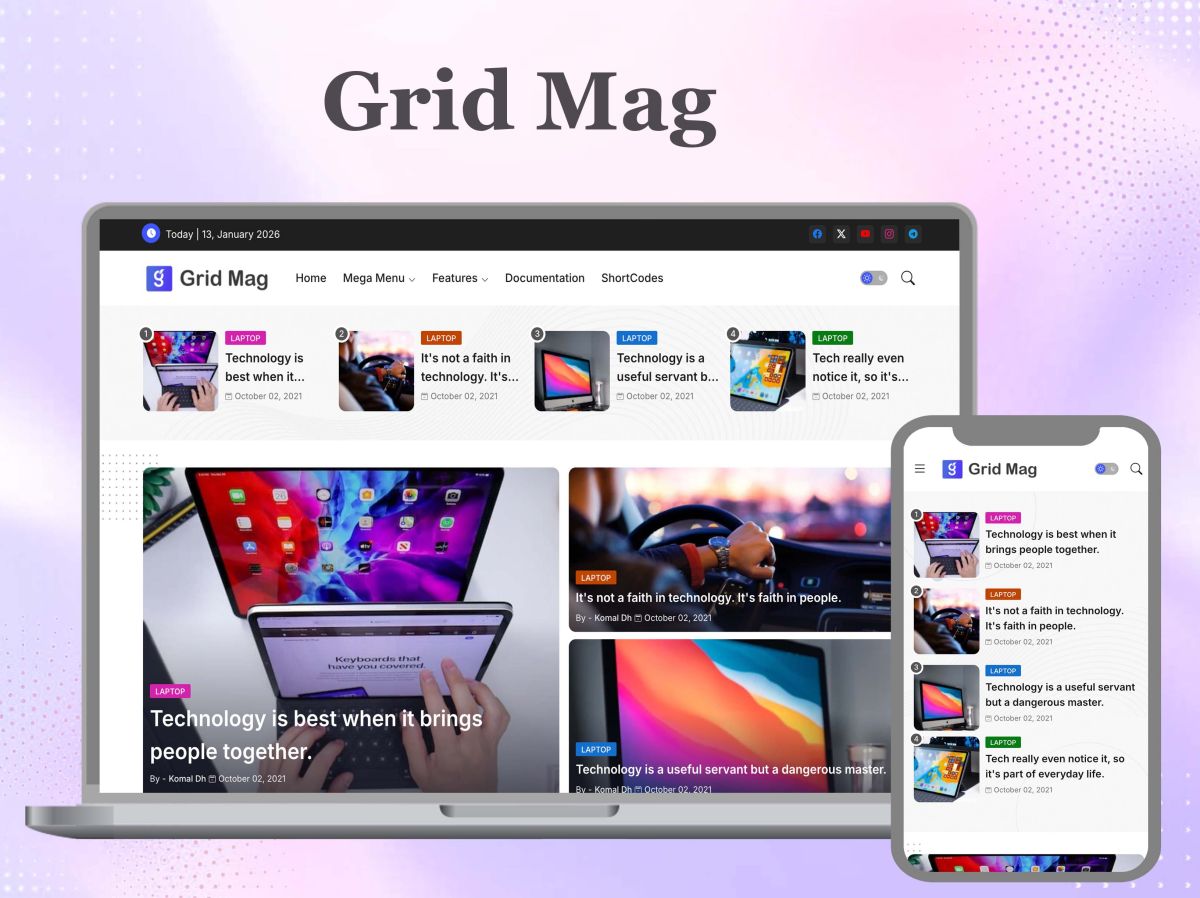
This is where the structure of your site enters into the picture as well as it comes to be as crucial as your e-mail strategy. If your email message is beautifully deliverable, but it leads to a clunky destination, then it’s wasted. This is the void that’s Piki Templates was created to fill. In Piki Templates, We have light weight and SEO optimized blogger templates and Adsense friendly Templates which is specially created for bloggers who depend on e-mail traffic to develop their blog site. Firstly, designs such as Grid Mag and Quick Spot are specially designed to be mobile-friendly and load speed optimized, so that when someone clicks on a link in your newsletter, they will be greeted with a page that is crisp and responsive on any screen size, and loads almost immediately. You don’t lose out on readers or subscribers because you have a slow website, you maintain the momentum that your e-mail created and that translates to pageviews, subscribers and revenue.
Email Marketers: Essential Web Setup A web setup essential for email marketers.
Your website structure should be as well-thought out as your subject line and send time if you’re looking to build your audience via email. Well, a well-built and clean site isn’t simply a “nice to have”, it’s the thing that generates you loyal visitors or paying customers out of your hard earned email traffic. This is important and here are some key areas to focus on:
Speed is non-negotiable. An example of a theme, such as Wind Spot from Piki Templates is created in an extremely light manner, eliminating all sorts of unneeded fluff and bloat, and making sure that pages are loaded quickly even on slow mobile connections.
Low Maintenance equals more time for your content. Piki Templates free blogger templates will perform well right out of the box, allowing you to write your next email message, rather than constantly updating plugins or fixing a broken layout.
When things are tidy, it’s better for the user. Bounce rate is even more likely to be a sign of whether visitors stay on an organized, easy-to-navigate page and read your content and click through to your next post or offer.
Where ads are shown is important for monetisation. Adsense Friendly Designs contain ads in a place where they are visible, but don’t overpower the reader, so you can truly monetize the traffic you’re gaining through your SMTP-powered campaigns.
Mobile responsive “saves” your open to click pipeline. With a large percentage of email being opened on mobile devices, an adaptive template will adjust on the fly to smaller screens, preventing this traffic from being bounced back out.
Think of your website as the end goal for each and every e-mail you send. But all of that work on deliverability is for naught if the landing experience doesn’t deliver like Unione.
Fostering self-assurance in sending and succeeding.
Mastering SMTP on even a basic level, puts you in control of your own communications. Whether you’re creating a first blog email handle or you’re running a full newsletter, you no longer view email as some kind of black box, but you’re able to troubleshoot and trust an email system that is logical and step-by-step. However, the well-sending doesn’t stop there. When that delivery performance is combined with a site designed on a fast, clean and well-structured template, you’ve got a website with hook – AND hold. That combination – reliable and rapid email delivery, plus a fast, responsive landing – is what translates into actual and sustained growth in email traffic.